Oceanology NextGen - Foam
Configure flow-based foam generation for wave crests, shorelines, and object interactions.
Prerequisites
| Requirement | Details |
|---|---|
| Engine | UE5.x (latest release) |
| Plugin | Oceanology NextGen installed and configured |
| Scene | Water body placed in your level |
| Skills | Basic Material Instance familiarity |
Foam parameters are exposed through the OceanologyInfiniteOcean material instance under the Foam category. Foam appears where waves crest, along shorelines, and around interacting objects.
- The system uses three texture channels: Diffuse (color and transparency), Height (displacement detail), and Normal (surface micro-detail).
- Foam rendering combines procedural wave data with texture mapping to create realistic coastal patterns, wave crests, and dynamic foam movement.
- Proper configuration of foam parameters significantly impacts visual quality and performance.
Step-by-step
Select the OceanologyInfiniteOcean actor in your level. In the Details panel, scroll to locate the Foam category. This section contains all parameters controlling foam appearance and behavior.
You will find parameters organized into several groups:
Basic Foam Properties:
- BumpOffset - Vertical position offset of foam relative to water surface.
- BumpPlane - Blending factor between foam and water surface.
- FoamOpacity - Overall foam transparency.
- FoamRoughness - Surface roughness of foam material.
- FoamContrastLevel - Contrast adjustment for foam visibility.
Texture Mapping:
- FoamMapping - UV scale for foam texture tiling.
- FlowSpeed - Speed of foam texture scrolling animation.
- FlowPower - Intensity of foam flow animation.
Depth Control:
- FoamDepthMin - Minimum water depth where foam appears.
Wave Integration:
- FoamWaveNormalZ - How foam follows wave surface normals.
- WaveDistortion - Procedural distortion applied to foam patterns.
Distance Fading:
- FadeLengthScattering - Distance over which foam fades from view.
- FadeOffsetScattering - Starting distance for foam fade.
Color Properties:
- FoamEmissive - Emissive color gradient for foam glow effects.
- FoamScattering - Scattering color that affects how light disperses through foam.
Texture Channels:
- T_FoamDiffuse - Diffuse color and alpha texture.
- T_FoamHeight - Height displacement texture.
- T_FoamNormal - Normal map for surface detail.
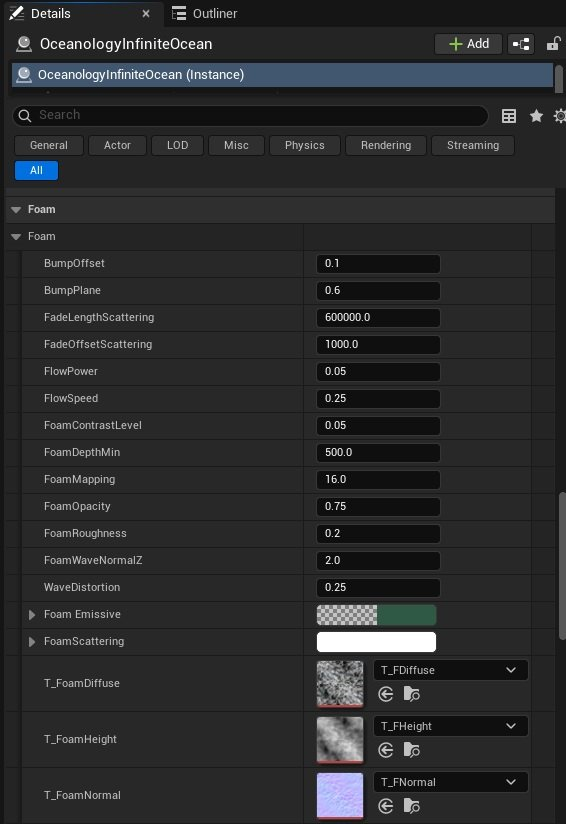
Foam Parameters Reference
The following sections provide detailed information about each foam parameter category.
Basic Foam Properties
| Parameter | Default Value | Range | Description |
|---|---|---|---|
| BumpOffset | 0.1 | 0.0 - 1.0 | Vertical offset of foam relative to the water surface. Higher values lift foam above the waves, creating a floating appearance. |
| BumpPlane | 0.6 | 0.0 - 1.0 | Blending factor between foam and water surface. Lower values create softer, more transparent edges. Higher values create sharper foam boundaries. |
| FoamOpacity | 0.75 | 0.0 - 1.0 | Overall transparency of foam. 1.0 = fully opaque, 0.0 = invisible. Primary control for foam visibility. |
| FoamRoughness | 0.2 | 0.0 - 1.0 | Surface roughness of foam material. Higher values create a matte appearance suitable for thick foam. Lower values create shinier, wetter-looking foam. |
| FoamContrastLevel | 0.05 | 0.0 - 0.5 | Contrast adjustment for foam appearance against water. Higher values make foam more pronounced and easier to see. |
Texture Mapping and Animation
| Parameter | Default Value | Range | Description |
|---|---|---|---|
| FoamMapping | 16.0 | 1.0 - 100.0 | UV scale for foam textures. Lower values stretch foam patterns over larger areas. Higher values create tighter tiling. Adjust based on world scale and desired foam size. |
| FlowSpeed | 0.25 | 0.0 - 2.0 | Speed of foam texture scrolling. Controls how quickly foam appears to move across the surface. 0.0 disables animation. |
| FlowPower | 0.05 | 0.0 - 1.0 | Intensity of foam flow animation. Higher values create more dramatic directional flow effects based on wave movement. |
| WaveDistortion | 0.25 | 0.0 - 2.0 | Amount of distortion applied to foam patterns. Creates organic, irregular foam edges. Higher values add visual complexity at the cost of performance. |
Depth and Wave Integration
| Parameter | Default Value | Range | Description |
|---|---|---|---|
| FoamDepthMin | 500.0 | 0.0 - 2000.0 | Minimum water depth where foam appears in Unreal units. Foam is visible in water shallower than this value. Lower values restrict foam to very shallow coastal areas. |
| FoamWaveNormalZ | 2.0 | 0.0 - 5.0 | Intensity of wave normal influence on foam placement. Higher values make foam follow wave peaks and crests more closely, creating concentrated foam on wave tops. |
Distance Fading and Performance
| Parameter | Default Value | Range | Description |
|---|---|---|---|
| FadeLengthScattering | 600000.0 | 10000.0 - 1000000.0 | Distance over which foam fades due to atmospheric scattering in Unreal units. Larger values extend foam visibility at distance. Reduce for performance optimization. |
| FadeOffsetScattering | 1000.0 | 0.0 - 10000.0 | Starting distance for foam scattering fade in Unreal units. Foam begins fading beyond this distance from the camera. |
Color Properties
| Parameter | Default Value | Description |
|---|---|---|
| FoamEmissive | Color gradient | Emissive color applied to foam. Creates subtle glow effects, useful for bioluminescent water, magical effects, or stylized visuals. Left color represents minimum intensity, right color represents maximum. |
| FoamScattering | Color gradient | Controls how light scatters through foam. Affects the perceived color of foam when backlit or when light passes through thin foam areas. Useful for achieving realistic subsurface scattering in foam. |
Foam Texture Channels
| Parameter | Default Texture | Purpose | Recommended Format |
|---|---|---|---|
| T_FoamDiffuse | T_FDiffuse | Color and alpha texture defining base foam appearance and transparency mask. | RGB + Alpha, sRGB enabled |
| T_FoamHeight | T_FHeight | Height map for foam displacement. Adds 3D surface detail to foam geometry. | Grayscale, sRGB disabled |
| T_FoamNormal | T_FNormal | Normal map for foam surface micro-detail. Creates fine surface variation and highlights. | RGB Normal Map, sRGB disabled |
Foam Configuration Guidelines
Use these guidelines to achieve specific visual styles and optimize performance.
Foam Intensity Presets
The following presets provide starting points for different ocean conditions:
| Scenario | FoamOpacity | FoamContrastLevel | FoamMapping | FoamDepthMin | FlowSpeed | WaveDistortion |
|---|---|---|---|---|---|---|
| Calm Ocean | 0.5 | 0.03 | 20.0 | 300.0 | 0.15 | 0.15 |
| Moderate Waves | 0.75 | 0.05 | 16.0 | 500.0 | 0.25 | 0.25 |
| Storm Conditions | 0.9 | 0.08 | 12.0 | 800.0 | 0.4 | 0.4 |
| Shallow Beach | 0.85 | 0.06 | 18.0 | 200.0 | 0.2 | 0.2 |
| Deep Ocean (Minimal) | 0.4 | 0.02 | 24.0 | 1000.0 | 0.1 | 0.1 |
Coastal Foam Configuration
Coastal foam appears in shallow water where waves interact with shorelines. Control it with these parameters:
| Goal | Parameter | Recommended Value | Notes |
|---|---|---|---|
| More coastal foam | FoamDepthMin | 200.0 - 400.0 | Lower values extend foam further from shore |
| Less coastal foam | FoamDepthMin | 600.0 - 1000.0 | Higher values restrict foam to very shallow areas |
| Sharper coastal edge | BumpPlane | 0.7 - 0.9 | Creates defined foam line along beach |
| Softer coastal blend | BumpPlane | 0.4 - 0.6 | Creates gradual foam transition |
| Brighter beach foam | FoamContrastLevel | 0.06 - 0.1 | Increases foam visibility against sand |
Wave Crest Foam Configuration
Foam that appears on top of waves is controlled independently:
| Goal | Parameter | Recommended Value | Notes |
|---|---|---|---|
| More wave foam | FoamWaveNormalZ | 2.5 - 4.0 | Increases foam on wave peaks |
| Less wave foam | FoamWaveNormalZ | 1.0 - 1.5 | Reduces foam concentration on crests |
| Elevated foam caps | BumpOffset | 0.15 - 0.3 | Lifts foam above wave surfaces |
| Integrated foam | BumpOffset | 0.0 - 0.1 | Keeps foam flush with water |
| Thick foam bands | BumpPlane | 0.6 - 0.8 | Creates wider foam strips on waves |
Foam Animation Configuration
Control foam movement and flow with these parameters:
| Animation Style | FlowSpeed | FlowPower | WaveDistortion | Result |
|---|---|---|---|---|
| Static | 0.0 | 0.0 | 0.0 | No animation, foam is fixed |
| Subtle drift | 0.1 - 0.2 | 0.03 - 0.05 | 0.1 - 0.2 | Gentle movement |
| Moderate flow | 0.25 - 0.35 | 0.05 - 0.08 | 0.25 - 0.35 | Noticeable scrolling |
| Rapid turbulence | 0.5 - 0.8 | 0.1 - 0.15 | 0.5 - 0.8 | Fast, chaotic motion |
Performance Optimization
Foam rendering impacts GPU performance through texture sampling, shader complexity, and overdraw. Use these strategies to optimize:
Texture Resolution Optimization
| Optimization Level | T_FoamDiffuse | T_FoamHeight | T_FoamNormal | Performance Gain |
|---|---|---|---|---|
| High Quality | 2048x2048 | 2048x2048 | 2048x2048 | Baseline (0%) |
| Medium Quality | 1024x1024 | 1024x1024 | 1024x1024 | ~15% faster |
| Low Quality | 512x512 | 512x512 | 512x512 | ~30% faster |
| Mobile | 512x512 | 256x256 | 512x512 | ~40% faster |
Shader Complexity Optimization
Reduce shader instruction count by disabling expensive features:
| Parameter | High Performance Value | Quality Impact | Performance Gain |
|---|---|---|---|
| WaveDistortion | 0.0 - 0.1 | Reduced organic variation | ~10% faster |
| FadeLengthScattering | 200000.0 | Foam disappears sooner | ~5% faster |
| FlowPower | 0.0 - 0.03 | Less dynamic flow | ~3% faster |
| FoamMapping | 24.0 - 32.0 | Tighter tiling (fewer samples) | ~8% faster |
Level of Detail (LOD) Strategy
Implement distance-based foam quality reduction:
| Distance Range | FoamOpacity | FadeLengthScattering | WaveDistortion | Notes |
|---|---|---|---|---|
| 0 - 5000 units | 0.75 | 600000.0 | 0.25 | Full quality near player |
| 5000 - 20000 | 0.6 | 400000.0 | 0.15 | Reduced detail at medium range |
| 20000+ | 0.4 | 200000.0 | 0.05 | Minimal foam at far distances |
Custom Foam Textures
Replace default foam textures to achieve unique visual styles.
Preparing Custom Textures
Texture Requirements:
| Texture Type | Resolution | Channels | Compression | sRGB |
|---|---|---|---|---|
| Diffuse | 1024x1024 - 2048x2048 | RGB + Alpha | BC3 (DXT5) | ✓ Enabled |
| Height | 1024x1024 | Grayscale | BC4 | ☐ Disabled |
| Normal | 1024x1024 | RGB Tangent Space | BC5 | ☐ Disabled |
Foam Texture Styles
| Style | Diffuse Characteristics | Height Characteristics | Use Case |
|---|---|---|---|
| Fine bubble foam | Many small foam clusters | Low height variation | Calm seas, gentle waves |
| Thick froth | Large connected foam areas | High height variation | Storm conditions, turbulent water |
| Coastal surf | Irregular foam bands | Medium height, edge emphasis | Beach shorelines |
| Ice/slush | Solid foam areas with cracks | Sharp height transitions | Cold water environments |
| Polluted/algae | Greenish/brownish tint | Minimal height | Industrial or swamp water |
Troubleshooting Common Issues
| Problem | Likely Cause | Solution |
|---|---|---|
| Foam not visible | FoamOpacity too low | Increase FoamOpacity to 0.5 or higher |
| Foam only in shallow water | FoamDepthMin too low | Increase FoamDepthMin value |
| Foam appears flat | T_FoamNormal not assigned or FoamRoughness too high | Assign normal texture and reduce roughness |
| Foam flickering at distance | FadeLengthScattering too low | Increase FadeLengthScattering value |
| Foam animation too fast | FlowSpeed too high | Reduce FlowSpeed to 0.1 - 0.2 |
| Foam edges too harsh | BumpPlane too high | Reduce BumpPlane to 0.4 - 0.5 |
| Foam not following waves | FoamWaveNormalZ too low | Increase FoamWaveNormalZ to 2.0 or higher |
| Performance issues | WaveDistortion and FlowPower too high | Reduce both values and increase FoamMapping |
| Foam color looks wrong | FoamScattering misconfigured | Adjust scattering color gradient |
| No foam glow effect | FoamEmissive not configured | Set emissive color gradient values |
Summary
In this guide, you learned how to:
- Access foam parameters - Locate and understand the Foam category in OceanologyInfiniteOcean material instance.
- Control foam appearance - Adjust opacity, contrast, roughness, and surface offset for different visual styles.
- Configure coastal and wave foam - Use depth parameters and wave normal influence to control where foam appears.
- Animate foam - Control flow speed, power, and distortion for realistic foam movement and organic variation.
- Customize foam colors - Use FoamEmissive and FoamScattering to achieve stylized or realistic color effects.
- Optimize performance - Adjust texture resolution, mapping scale, and fade distances to balance quality and performance.
- Replace textures - Import and assign custom foam textures for unique visual styles and artistic direction.
- Troubleshoot issues - Diagnose and fix common foam visibility, animation, and performance problems.
With this knowledge, you can fine-tune foam appearance to match your ocean environment's artistic direction, performance requirements, and gameplay needs.