Oceanology NextGen - Shore Waves
Simulate realistic coastal wave behavior with math-based breaking waves and directional flow.
Prerequisites
| Requirement | Details |
|---|---|
| Engine | UE5.x (latest release) |
| Plugin | Oceanology NextGen installed and configured |
| Scene | Ocean actor + landscape/coastline geometry |
| Skills | Basic wave physics understanding |
Shore Waves simulate coastal behavior where ocean waves interact with shorelines - wave breaking, directional flow, and beach swaying. Add Oceanology Water Niagara Waves Volume for visual particle effects.
Step-by-step
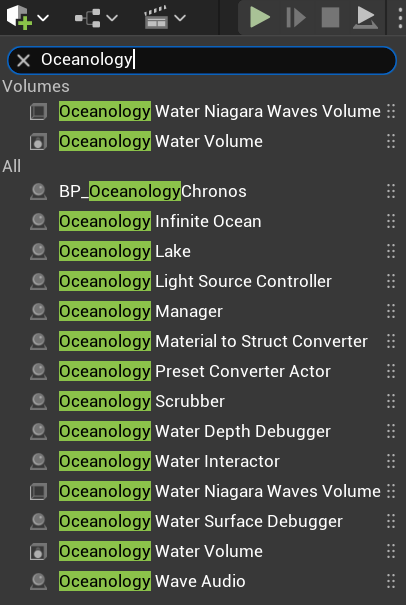
Open your level and use the Quickly Add to the Project menu (the + button in the toolbar or right-click in the viewport). Type Oceanology in the search field to filter the available actors.
Locate the following shore-related actors:
Volumes:
- Oceanology Water Niagara Waves Volume - Creates visual particle effects for breaking waves along shorelines. This volume triggers Niagara particle systems when waves reach the coast.
- Oceanology Water Volume - General water interaction volume for buoyancy and swimming.
Other useful actors:
- Oceanology Infinite Ocean - The main ocean water body.
- Oceanology Water Interactor - Enables object interaction with water surfaces.
Drag Oceanology Water Niagara Waves Volume into your scene and position it along your coastline where you want breaking wave effects to appear.
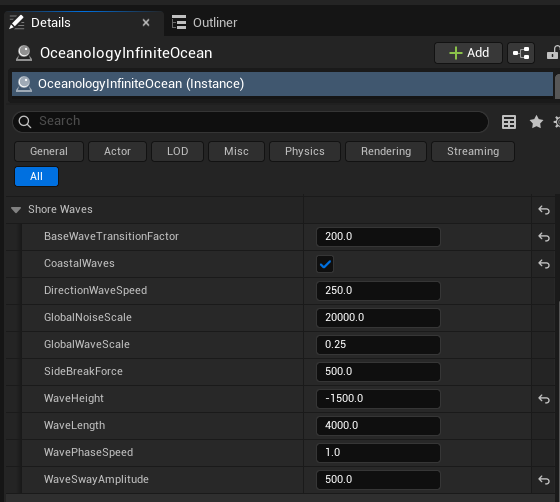
Select the OceanologyInfiniteOcean actor in your level. In the Details panel, locate and expand the Shore Waves category. Here you will find all parameters controlling coastal wave behavior:
Transition Settings:
- BaseWaveTransitionFactor -
200.0. Controls how waves transition from deep water behavior to shore wave behavior. Higher values create a more gradual transition.
Coastal Wave Toggle:
- CoastalWaves - ✅ Enabled. Master toggle for the shore wave system. When disabled, waves will not exhibit coastal breaking behavior.
Wave Motion:
- DirectionWaveSpeed -
250.0. The speed at which waves travel toward the shore. Higher values create faster-moving coastal waves. - GlobalNoiseScale -
20000.0. Scale of the noise pattern applied to wave variation. Larger values create broader, more gradual variations. - GlobalWaveScale -
0.25. Overall scale multiplier for shore wave intensity. Values below 1.0 reduce wave prominence.
Breaking Wave Behavior:
- SideBreakForce -
500.0. Force applied to waves as they break sideways along the shore. Creates the characteristic lateral spread of breaking waves. - WaveHeight -
-1500.0. The vertical displacement of shore waves. Negative values indicate waves that curl downward as they break. - WaveLength -
4000.0. Distance between wave crests along the shoreline. Larger values create longer, more spread-out wave patterns.
Animation:
- WavePhaseSpeed -
1.0. Speed of the wave phase animation. Higher values make waves cycle faster. - WaveSwayAmplitude -
500.0. The side-to-side swaying motion of waves as they approach shore. Creates natural oscillation in wave direction.
Parameter Reference
| Parameter | Default | Range | Effect |
|---|---|---|---|
| BaseWaveTransitionFactor | 200.0 | 50 - 500 | Smoothness of deep-to-shore transition |
| CoastalWaves | ✅ Enabled | On/Off | Enables shore wave behavior |
| DirectionWaveSpeed | 250.0 | 100 - 500 | Wave approach speed |
| GlobalNoiseScale | 20000.0 | 5000 - 50000 | Wave variation pattern size |
| GlobalWaveScale | 0.25 | 0.1 - 1.0 | Overall shore wave intensity |
| SideBreakForce | 500.0 | 100 - 1000 | Lateral breaking spread |
| WaveHeight | -1500.0 | -3000 - 0 | Breaking wave curl height |
| WaveLength | 4000.0 | 1000 - 10000 | Distance between wave crests |
| WavePhaseSpeed | 1.0 | 0.5 - 2.0 | Animation cycle speed |
| WaveSwayAmplitude | 500.0 | 100 - 1000 | Side-to-side oscillation |
Configuration Guidelines
| Scenario | Key Settings |
|---|---|
| Calm beach | GlobalWaveScale: 0.15, WaveHeight: -800, SideBreakForce: 200 |
| Active surf | GlobalWaveScale: 0.35, WaveHeight: -2000, SideBreakForce: 600 |
| Stormy coast | GlobalWaveScale: 0.5, WaveHeight: -2500, DirectionWaveSpeed: 400 |
| Gentle lake shore | CoastalWaves: Disabled or GlobalWaveScale: 0.1 |
| Long rolling waves | WaveLength: 8000, WavePhaseSpeed: 0.7 |
| Quick choppy waves | WaveLength: 2000, WavePhaseSpeed: 1.5 |
Troubleshooting Common Issues
| Problem | Likely Cause | Solution |
|---|---|---|
| No shore wave effects | CoastalWaves disabled | Enable CoastalWaves checkbox |
| Waves don't break at shore | No depth transition | Ensure landscape slopes into water |
| Breaking looks too abrupt | Transition factor too low | Increase BaseWaveTransitionFactor |
| Waves too subtle | GlobalWaveScale too low | Increase GlobalWaveScale toward 0.5 |
| Waves too intense | GlobalWaveScale too high | Reduce GlobalWaveScale toward 0.15 |
| No particle spray effects | Missing volume actor | Add Oceanology Water Niagara Waves Volume |
| Waves moving wrong direction | DirectionWaveSpeed sign | Check ocean wave direction settings |
| Animation too fast/slow | WavePhaseSpeed incorrect | Adjust WavePhaseSpeed value |
Summary
In this guide, you learned how to:
- Add visual wave effects - Use the Water Niagara Waves Volume for particle-based breaking wave effects.
- Configure Shore Waves settings - Adjust wave height, speed, and breaking behavior for realistic coastal simulation.
With Shore Waves properly configured, your coastlines will feature realistic breaking wave behavior that responds naturally to the shoreline geometry, creating immersive beach and coastal environments.