Oceanology NextGen - Shoreline Wetness
🏖️ Wet Sand
💧 Moisture Effects
🎨 PBR
Simulate realistic wet sand and moisture effects along coastlines where waves meet the shore.
Prerequisites
| Requirement | Details |
|---|---|
| Engine | UE5.x (latest release) |
| Plugin | Oceanology NextGen installed and configured |
| Scene | Water body placed in your level |
| Skills | Basic PBR and material understanding |
About Shoreline Wetness
Configured on the OceanologyInfiniteOcean actor under the Shoreline Wetness category. Creates realistic wet sand appearance where waves touch the beach.
- The wetness effect dynamically adjusts based on wave activity and distance from the water surface, creating realistic tidal zone visuals.
Step-by-step
1. Configure Shoreline Wetness parameters
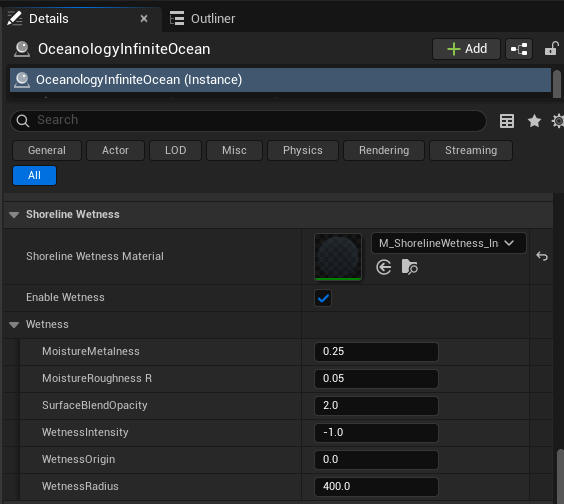
Select the OceanologyInfiniteOcean actor in the Outliner. In the Details panel, locate and expand the Shoreline Wetness category.
Shoreline Wetness Material:
- Shoreline Wetness Material - The material instance used for wetness rendering. Default:
M_ShorelineWetness_In.
Enable Wetness:
- Enable Wetness - Toggle to enable or disable the shoreline wetness system. Default: ✅ Enabled.
Wetness subcategory contains the core parameters:
- MoistureMetalness - Metalness value applied to wet surfaces. Wet sand typically has slightly higher metalness due to water reflectivity. Default:
0.25. - MoistureRoughnessR - Roughness reduction for wet surfaces. Lower values create more reflective wet appearance. Default:
0.05. - SurfaceBlendOpacity - Opacity of the wetness blend over the underlying surface. Default:
2.0. - WetnessIntensity - Overall intensity multiplier for the wetness effect. Negative values can invert the effect. Default:
-1.0. - WetnessOrigin - Vertical origin point for wetness calculations relative to the water surface. Default:
0.0. - WetnessRadius - Radius of the wetness effect from the shoreline. Larger values extend wetness further inland. Default:
400.0.
Parameter Quick Reference
Shoreline Wetness
| Parameter | Default | Description |
|---|---|---|
| Shoreline Wetness Material | M_ShorelineWetness_In | Material for wetness rendering |
| Enable Wetness | ✅ Enabled | Toggle wetness system |
Wetness
| Parameter | Default | Range | Description |
|---|---|---|---|
| MoistureMetalness | 0.25 | 0.0 - 1.0 | Metalness of wet surfaces |
| MoistureRoughnessR | 0.05 | 0.0 - 1.0 | Roughness of wet surfaces |
| SurfaceBlendOpacity | 2.0 | 0.0 - 10.0 | Wetness blend opacity |
| WetnessIntensity | -1.0 | -10.0 - 10.0 | Overall wetness intensity |
| WetnessOrigin | 0.0 | - | Vertical origin offset |
| WetnessRadius | 400.0 | 0.0 - 10000.0 | Wetness effect radius |
Troubleshooting Common Issues
| Problem | Likely Cause | Solution |
|---|---|---|
| No wetness visible | Enable Wetness unchecked | Enable the Enable Wetness checkbox |
| Wetness too subtle | WetnessIntensity too low | Increase WetnessIntensity (try positive values) |
| Wetness extends too far | WetnessRadius too high | Reduce WetnessRadius value |
| Wet surface not reflective enough | MoistureRoughnessR too high | Decrease MoistureRoughnessR closer to 0.0 |
| Harsh wetness transitions | SurfaceBlendOpacity too high | Reduce SurfaceBlendOpacity for softer blending |
| Wetness appears at wrong height | WetnessOrigin misconfigured | Adjust WetnessOrigin to match water level |
Summary
In this guide, you learned how to:
- Enable Shoreline Wetness - Activate the wetness system and assign the appropriate material.
- Configure Moisture Properties - Adjust metalness and roughness to simulate wet surface appearance.
- Control Wetness Distribution - Set intensity, origin, and radius to define where wetness appears along the shoreline.
With this knowledge, you can now create realistic wet sand and moisture effects along your coastlines that respond dynamically to the water surface.