Oceanology NextGen - QuadTree
Dynamic mesh generation with GPU-accelerated QuadTree tessellation for optimal quality and performance.
Prerequisites
| Requirement | Details |
|---|---|
| Engine | UE5.x (latest release) |
| Plugin | Oceanology NextGen installed and configured |
| Scene | Oceanology Infinite Ocean placed in level |
| Skills | Basic understanding of LOD systems |
NextGen uses GPU-accelerated QuadTree tessellation that dynamically adjusts mesh density based on camera distance. Includes Far Mesh for horizon rendering at minimal GPU cost. Settings affect both visual quality and performance.
Step-by-step
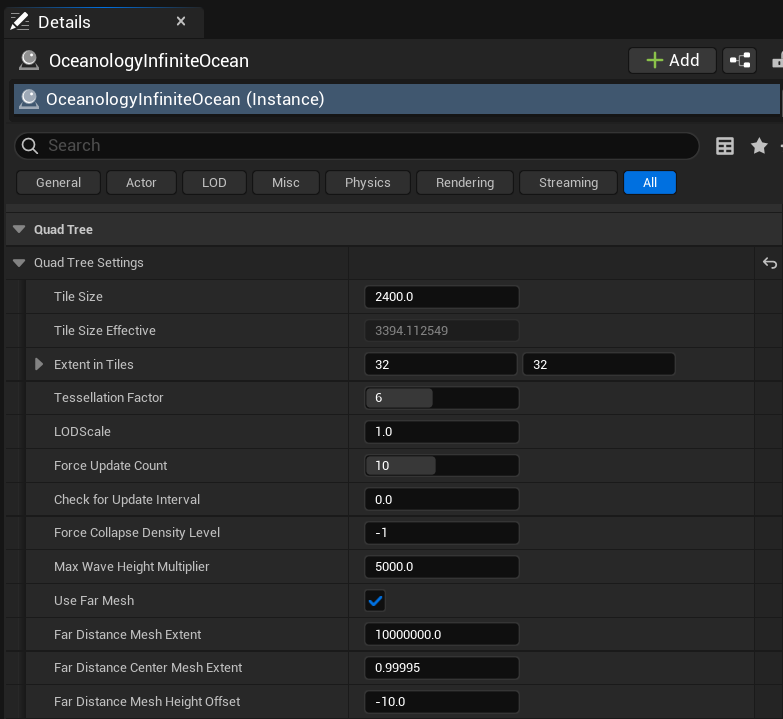
Select OceanologyInfiniteOcean in the Outliner. In the Details panel, locate the Quad Tree category. This section contains all tessellation and LOD parameters.
Expand Quad Tree Settings to view the full configuration options.
Quad Tree Settings Parameters:
| Parameter | Default | Description |
|---|---|---|
| Tile Size | 2400.0 | Base size of each QuadTree tile in Unreal units. Larger tiles cover more area but with less base detail. |
| Tile Size Effective | 3394.11... | Calculated effective tile size after LOD adjustments. Read-only diagnostic value. |
| Extent in Tiles | 32 x 32 | Number of tiles in X and Y directions from the center. Total coverage = TileSize × ExtentInTiles × 2. |
| Tessellation Factor | 6 | Maximum tessellation subdivision level. Higher values create denser meshes near the camera. Range: 1-8. |
| LODScale | 1.0 | Multiplier for LOD distance calculations. Higher values push LOD transitions further from camera. |
| Force Update Count | 10 | Number of frames to force QuadTree updates after camera movement. Ensures smooth transitions. |
| Check for Update Interval | 0.0 | Time between QuadTree update checks in seconds. 0.0 = check every frame. |
| Force Collapse Density Level | -1 | Forces all tiles to collapse to a specific density level. -1 = automatic (disabled). |
| Max Wave Height Multiplier | 5000.0 | Multiplier for wave height in LOD calculations. Ensures tessellation accounts for vertical displacement. |
Far Mesh Settings:
| Parameter | Default | Description |
|---|---|---|
| Use Far Mesh | ✓ | Enables a low-detail mesh for the distant horizon. Essential for infinite ocean appearance. |
| Far Distance Mesh Extent | 10000000.0 | Size of the far mesh in Unreal units. Default covers 10,000 km for true horizon rendering. |
| Far Distance Center Mesh Extent | 0.99995 | Percentage of far mesh that uses the center (higher detail) section. |
| Far Distance Mesh Height Offset | -10.0 | Vertical offset for the far mesh. Negative values prevent z-fighting with the main ocean. |
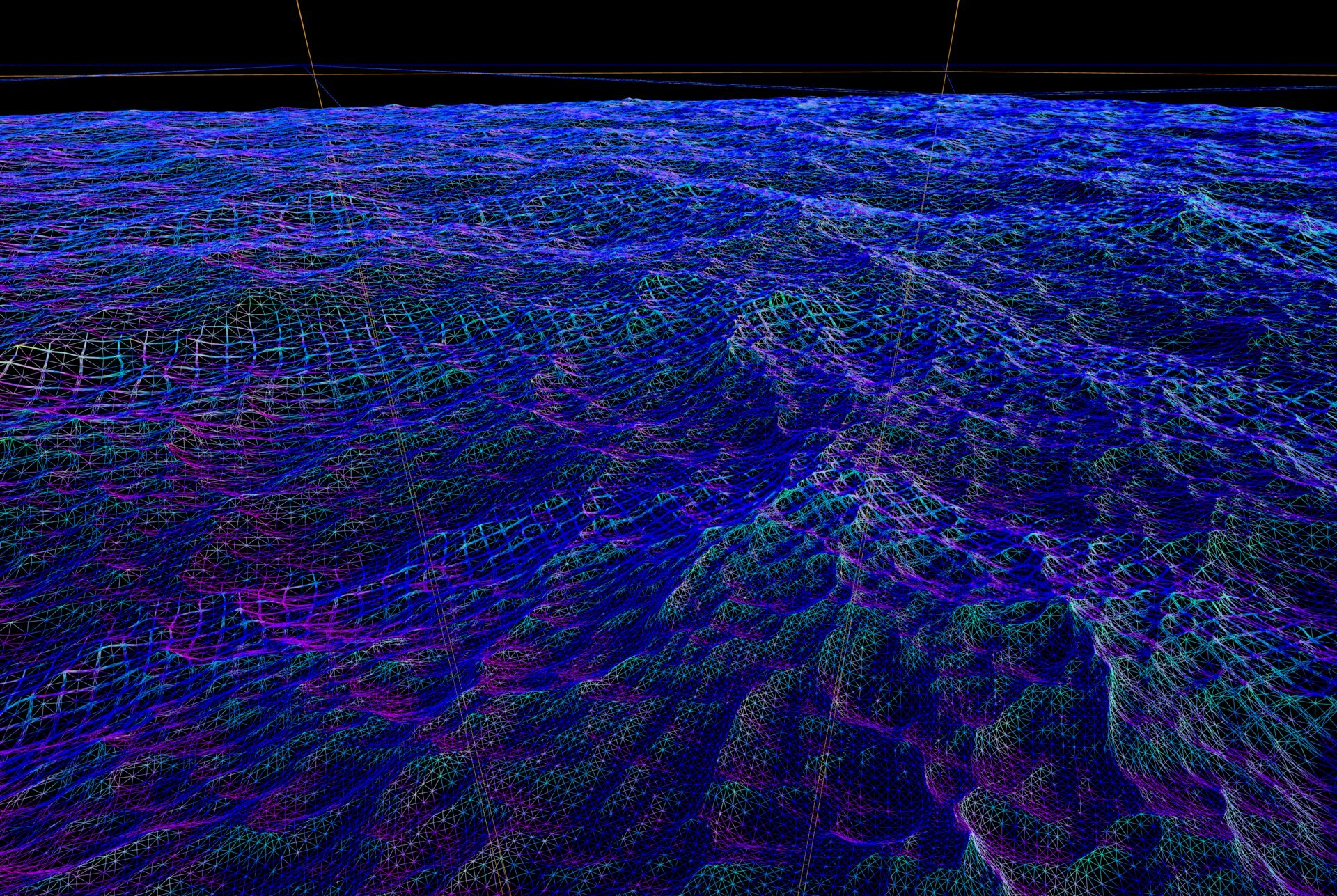
The QuadTree system creates a dynamic mesh that adapts to camera position. When viewed in wireframe mode, you can see how tiles subdivide near the camera and merge in the distance.
Wireframe Visualization Key:
- Dense mesh (near camera) - Maximum tessellation for wave detail and close-up quality.
- Medium density (mid-distance) - Balanced tessellation for good visual quality with reduced triangle count.
- Sparse mesh (far distance) - Minimal tessellation where detail isn't visible, maximizing performance.
- Color variation - Different colors represent different LOD levels in the QuadTree hierarchy.
How QuadTree Works:
- Initial Grid - The ocean starts as a grid of base tiles defined by
Tile SizeandExtent in Tiles. - Distance Evaluation - Each frame, the system evaluates camera distance to each tile.
- Subdivision - Tiles close to the camera subdivide into 4 smaller tiles, up to
Tessellation Factorlevels. - Collapse - Distant tiles merge into larger, lower-detail tiles.
- Seamless Stitching - Adjacent tiles of different LOD levels are stitched to prevent cracks.
Performance Characteristics:
- Triangle count scales logarithmically with distance, not linearly.
- Near-camera detail remains constant regardless of ocean size.
- GPU tessellation is more efficient than CPU-based LOD systems.
QuadTree Parameter Reference
Core Tessellation Parameters
| Parameter | Range | Default | Performance Impact |
|---|---|---|---|
| Tile Size | 500.0 - 10000.0 | 2400.0 | Larger = fewer tiles, less CPU overhead |
| Extent in Tiles | 4 - 128 | 32 | Larger = more ocean coverage, more memory |
| Tessellation Factor | 1 - 8 | 6 | Higher = more triangles near camera |
| LODScale | 0.1 - 5.0 | 1.0 | Higher = more detail at distance |
Far Mesh Parameters
| Parameter | Range | Default | Description |
|---|---|---|---|
| Use Far Mesh | Boolean | ✓ | Toggle horizon mesh |
| Far Distance Mesh Extent | 100000.0 - 100000000.0 | 10000000.0 | Horizon distance |
| Far Distance Mesh Height Offset | -100.0 - 0.0 | -10.0 | Z-fighting prevention |
Performance Tuning
Optimization Strategies
| Goal | Parameter Adjustments |
|---|---|
| Increase FPS | Reduce Tessellation Factor to 4, increase Tile Size to 3200 |
| Better close-up detail | Increase Tessellation Factor to 8, reduce Tile Size to 1600 |
| Larger ocean coverage | Increase Extent in Tiles to 64, enable Use Far Mesh |
| Reduce memory usage | Reduce Extent in Tiles to 16, increase Tile Size |
| Smoother LOD transitions | Increase Force Update Count to 20, set LODScale to 1.5 |
Hardware Recommendations
| Hardware Tier | Tessellation Factor | Tile Size | Extent in Tiles |
|---|---|---|---|
| High-End (RTX 4080+) | 8 | 2000.0 | 64 |
| Mid-Range (RTX 3080) | 6 | 2400.0 | 32 |
| Entry (RTX 3060) | 4 | 3200.0 | 24 |
Preset Configurations
| Scenario | Tile Size | Extent | Tess. Factor | LODScale | Notes |
|---|---|---|---|---|---|
| Maximum Quality | 1600.0 | 64 | 8 | 1.5 | Highest detail, requires powerful GPU |
| Balanced (Default) | 2400.0 | 32 | 6 | 1.0 | Good quality/performance balance |
| Performance | 3200.0 | 24 | 4 | 0.8 | Optimized for consistent FPS |
| Cinematic | 2000.0 | 48 | 8 | 2.0 | Maximum detail for film rendering |
| Mobile/Low-End | 4000.0 | 16 | 3 | 0.5 | Minimal GPU load |
Interaction with Other Systems
| System | Interaction |
|---|---|
| Waves | Tessellation must be sufficient to represent wave displacement. Low tessellation = blocky waves. |
| Buoyancy | Wave sampling is independent of tessellation but visual quality depends on mesh density. |
| Materials | Higher tessellation allows more accurate per-vertex calculations in the ocean shader. |
| World Partition | QuadTree is compatible with World Partition streaming for massive worlds. |
| Rendering | Triangle count directly affects GPU vertex/pixel shader workload. |
Troubleshooting
| Problem | Likely Cause | Solution |
|---|---|---|
| Waves look blocky/angular | Tessellation Factor too low | Increase Tessellation Factor to 6 or higher |
| Ocean doesn't extend to horizon | Far Mesh disabled or too small | Enable Use Far Mesh, increase Far Distance Mesh Extent |
| Visible seams between tiles | LOD stitching issue | Ensure Force Update Count is at least 10 |
| Poor performance | Too many triangles | Reduce Tessellation Factor or increase Tile Size |
| Ocean pops/flickers | Update interval too high | Set Check for Update Interval to 0.0 |
| Z-fighting at horizon | Far mesh height conflict | Adjust Far Distance Mesh Height Offset to -20.0 |
| Ocean too small | Extent in Tiles too low | Increase Extent in Tiles or enable Use Far Mesh |
Technical Deep Dive
QuadTree Algorithm
The QuadTree tessellation follows this hierarchical structure:
Level 0: 1 tile (root)
Level 1: 4 tiles (2×2)
Level 2: 16 tiles (4×4)
Level 3: 64 tiles (8×8)
...
Level N: 4^N tiles
Subdivision Criteria:
- Screen-space error threshold based on camera distance.
- Wave height consideration via
Max Wave Height Multiplier. - Frustum culling to skip off-screen tiles.
Memory Footprint:
- Base memory:
Extent in Tiles²tile structures. - Vertex buffer scales with
Tessellation Factor. - Far mesh adds minimal overhead (single low-poly plane).
Coverage Calculation
Total ocean coverage can be calculated as:
Coverage = Tile Size × Extent in Tiles × 2
Example: 2400 × 32 × 2 = 153,600 Unreal units (1.536 km per axis)
With Use Far Mesh enabled, visual coverage extends to Far Distance Mesh Extent (default 10,000 km).
Summary
In this guide, you learned how to:
- Access QuadTree settings - Find the Quad Tree category in the ocean actor's Details panel.
- Configure tile parameters - Adjust Tile Size, Extent in Tiles, and Tessellation Factor for your needs.
- Understand LOD behavior - Learn how the QuadTree subdivides and collapses based on camera distance.
- Enable the Far Mesh - Extend ocean visibility to the horizon with minimal performance cost.
- Optimize for performance - Balance visual quality with frame rate using the provided presets.
- Troubleshoot common issues - Diagnose and fix blocky waves, seams, and performance problems.
With proper QuadTree configuration, Oceanology Next-Gen can render infinite oceans with consistent detail near the camera while maintaining excellent performance across the entire visible range.