Riverology - Caustics
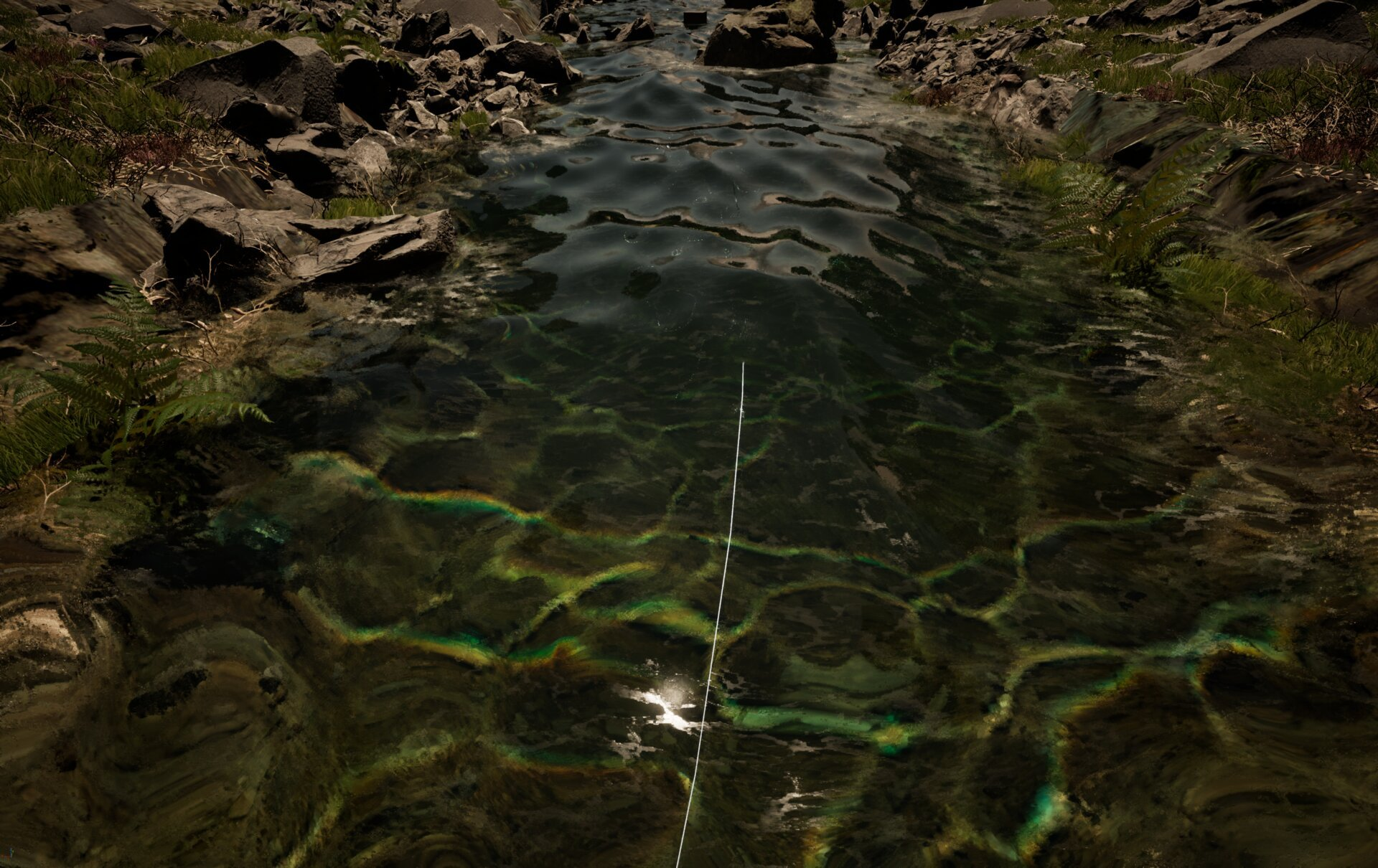
Create dancing underwater light patterns projected onto the riverbed.
Prerequisites
| Requirement | Details |
|---|---|
| Engine | UE5.x (latest release) |
| Plugin | Riverology installed and configured |
| Scene | BP_Riverology river + Directional Light |
| Skills | Basic Materials and Lighting understanding |
Caustics are animated light patterns on the riverbed from sunlight through moving water. Built into BP_Riverology - enable and configure directly from the Details panel.
Step-by-step
Select your BP_Riverology actor in the Outliner. In the Details panel, click the Misc category tab to filter the settings. Expand the Caustic System section to reveal all caustic parameters.
The following settings are available:
| Parameter | Default | Description |
|---|---|---|
| Project Caustics | ✅ Enabled | Master toggle for the caustic effect. Disable to turn off caustics entirely. |
| Caustics Scale | 2048.0 | Controls the size of the caustic pattern in world units. Higher values create larger, more spread-out light patterns. |
| Caustics Shore Mip | 2.0 | Mip level used for caustics near the shore. Higher values create softer, less detailed caustics at shallow depths. |
| Caustics Fade In Distance | 200.0 | Distance in units over which caustics fade in from the water surface. Prevents harsh caustic boundaries at the waterline. |
| Caustics Playback FPS | 30.0 | Animation speed of the caustic texture. Higher values create faster-moving light patterns. |
| Caustics Brightness | 4.0 | Intensity multiplier for the caustic effect. Increase for sunnier scenes, decrease for overcast conditions. |

With Project Caustics enabled, the caustic light patterns will appear on the riverbed and any submerged geometry. The effect is most visible in shallow, clear water with good lighting.
The caustics animate automatically based on the water surface motion and the Caustics Playback FPS setting. Adjust Caustics Brightness to match your scene's lighting conditions.
Parameter Tuning Guidelines
| Scenario | Recommended Adjustments |
|---|---|
| Bright sunny day | Increase Caustics Brightness to 6.0–8.0 |
| Overcast or shaded | Decrease Caustics Brightness to 2.0–3.0 |
| Wide river | Increase Caustics Scale to 3000.0–4096.0 |
| Narrow stream | Decrease Caustics Scale to 1024.0–1500.0 |
| Calm water | Decrease Caustics Playback FPS to 15.0–20.0 |
| Turbulent rapids | Increase Caustics Playback FPS to 45.0–60.0 |
| Deep water | Increase Caustics Fade In Distance to 400.0–600.0 |
Troubleshooting Common Issues
| Problem | Likely Cause | Solution |
|---|---|---|
| No caustics visible | Project Caustics disabled | Enable Project Caustics checkbox |
| Caustics too faint | Low brightness or weak lighting | Increase Caustics Brightness or add stronger directional light |
| Caustics too harsh | Brightness too high | Decrease Caustics Brightness to 2.0–4.0 |
| Caustics appear pixelated | Scale too small | Increase Caustics Scale value |
| Caustics animate too fast | High playback FPS | Decrease Caustics Playback FPS to 20.0–30.0 |
| Sharp edge at waterline | Fade distance too low | Increase Caustics Fade In Distance |
| Caustics visible on land | Water volume bounds incorrect | Adjust river spline or water depth settings |
Summary
In this guide, you learned how to:
- Locate the Caustic System settings - Find and expand the caustic parameters in the BP_Riverology Details panel.
- Configure caustic appearance - Adjust scale, brightness, and animation speed to match your scene.
- Tune for different scenarios - Apply recommended settings for various lighting and water conditions.
Caustics add significant visual realism to river scenes with minimal performance cost. Experiment with the parameters to achieve the look that best matches your environment's lighting and mood.